A Planned National Science Foundation Industry-University Cooperative Research Center

The center is a collaboration between the University of Louisiana at Lafayette, Tulane University, the Georgia Institute of Technology, and the University of Florida.
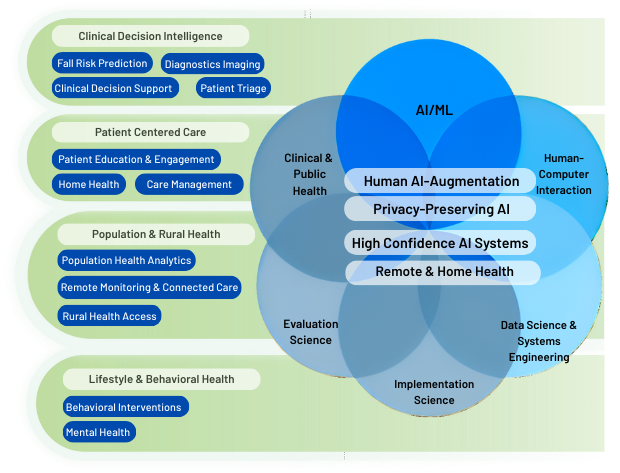
NSF AHeAD brings university researchers with healthcare industry stakeholders to conduct foundational research needed to create usable AI-augmented decision support tools that enhance healthcare delivery, improve patient outcomes, and reduce costs.
The AHeAD center addresses research gaps to make AI-Augmented systems safer and more usable across health systems. Even with significant promise in AI to improve care delivery and control costs, organizations face barriers to safe and effective implementation, including concerns about AI accuracy, patient safety and integration with health system workflows. AHeAD brings together leading AI researchers and implementation experts to address these challenges related to Human-AI interaction, privacy-preserving AI, and the robustness of AI models.
The center will develop best practices, evaluation frameworks, open models, and practical toolkits that health organizations can use to deploy AI systems more safely and effectively, train the next generation of AI healthcare specialists, and accelerate industry-wide adoption.
Foundational AI Research
Visit the website
View press release



What is an NSF Industry University Cooperative Research Center?
AHeAD follows the well-established National Science Foundation Industry University Cooperative Research Center (IUCRC) program framework to accelerate the development of critical technologies from early-stage research to the marketplace.
The graphic below explains the collaborative model (provided by the National Science Foundation).
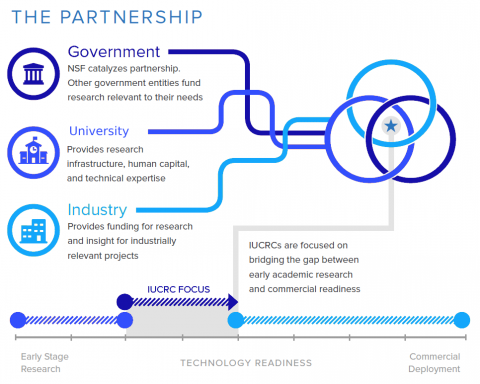
Visit IUCRC.NSF.GOV for more information.
Partner with the AHeAD Center to create next-generation AI-augmented healthcare decision-support tools for your organization.
You are welcome to download and share the center overview document. (View PDF)
Visit the website
Enable GingerCannot connect to Ginger Check your internet connection
or reload the browserDisable Ginger?How to use GingerRephraseRephrase with Ginger (Ctrl+Alt+E)Edit in Ginger
Enable GingerCannot connect to Ginger Check your internet connection
or reload the browserDisable Ginger?How to use GingerRephraseRephrase with Ginger (Ctrl+Alt+E)Edit in Ginger
Enable GingerCannot connect to Ginger Check your internet connection
or reload the browserDisable Ginger?How to use GingerRephraseRephrase with Ginger (Ctrl+Alt+E)Edit in Ginger
Enable GingerCannot connect to Ginger Check your internet connection
or reload the browserDisable Ginger?How to use GingerRephraseRephrase with Ginger (Ctrl+Alt+E)Edit in Ginger
Enable GingerCannot connect to Ginger Check your internet connection
or reload the browserDisable Ginger?How to use GingerRephraseRephrase with Ginger (Ctrl+Alt+E)Edit in Ginger
Enable GingerCannot connect to Ginger Check your internet connection
or reload the browserDisable Ginger?How to use GingerRephraseRephrase with Ginger (Ctrl+Alt+E)Edit in Ginger
Enable GingerCannot connect to Ginger Check your internet connection
or reload the browserDisable Ginger?How to use GingerRephraseRephrase with Ginger (Ctrl+Alt+E)Edit in Ginger
Enable GingerCannot connect to Ginger Check your internet connection
or reload the browserDisable Ginger?How to use GingerRephraseRephrase with Ginger (Ctrl+Alt+E)Edit in Ginger
Enable GingerCannot connect to Ginger Check your internet connection
or reload the browserDisable Ginger?How to use GingerRephraseRephrase with Ginger (Ctrl+Alt+E)Edit in Ginger
Enable GingerCannot connect to Ginger Check your internet connection
or reload the browserDisable Ginger?How to use GingerRephraseRephrase with Ginger (Ctrl+Alt+E)Edit in Ginger
Enable GingerCannot connect to Ginger Check your internet connection
or reload the browserDisable Ginger?How to use GingerRephraseRephrase with Ginger (Ctrl+Alt+E)Edit in Ginger
Enable GingerCannot connect to Ginger Check your internet connection
or reload the browserDisable Ginger?How to use GingerRephraseRephrase with Ginger (Ctrl+Alt+E)Edit in Ginger
Enable GingerCannot connect to Ginger Check your internet connection
or reload the browserDisable Ginger?How to use GingerRephraseRephrase with Ginger (Ctrl+Alt+E)Edit in Ginger
Enable GingerCannot connect to Ginger Check your internet connection
or reload the browserDisable Ginger?How to use GingerRephraseRephrase with Ginger (Ctrl+Alt+E)Edit in Ginger
Enable GingerCannot connect to Ginger Check your internet connection
or reload the browserDisable Ginger?How to use GingerRephraseRephrase with Ginger (Ctrl+Alt+E)Edit in Ginger
Enable GingerCannot connect to Ginger Check your internet connection
or reload the browserDisable Ginger?How to use GingerRephraseRephrase with Ginger (Ctrl+Alt+E)Edit in Ginger
Enable GingerCannot connect to Ginger Check your internet connection
or reload the browserDisable Ginger?How to use GingerRephraseRephrase with Ginger (Ctrl+Alt+E)Edit in Ginger
Enable GingerCannot connect to Ginger Check your internet connection
or reload the browserDisable Ginger?How to use GingerRephraseRephrase with Ginger (Ctrl+Alt+E)Edit in Ginger
Enable GingerCannot connect to Ginger Check your internet connection
or reload the browserDisable Ginger?How to use GingerRephraseRephrase with Ginger (Ctrl+Alt+E)Edit in Ginger
Enable GingerCannot connect to Ginger Check your internet connection
or reload the browserDisable Ginger?How to use GingerRephraseRephrase with Ginger (Ctrl+Alt+E)Edit in Ginger
Enable GingerCannot connect to Ginger Check your internet connection
or reload the browserDisable Ginger?How to use GingerRephraseRephrase with Ginger (Ctrl+Alt+E)Edit in Ginger
